顯示具有 proxmox 標籤的文章。 顯示所有文章

2020年7月15日 星期三

Proxmox Backup Server (beta)

Proxmox Backup Server is an enterprise client-server backup software that safely backups VMs, containers, and physical hosts. It is specially optimized for the Proxmox VE platform and efficiently protects and replicates your business-critical data.

Like all of our other Proxmox solutions, the Proxmox Backup Server is fast to install and is centrally managed. With the intuitive, web-based user interface and a command line you can easily administrate all your backup and restore jobs.

Key Features

  • Easy to setup and use client/server backup software
  • Seamless integration into Proxmox VE
  • Incremental backups
  • Data deduplication
  • Compression
  • Authenticated encryption
  • Remote Sync
  • Software stack written in Rust providing high speed and memory efficiency
  • License: GNU AGPL, v3

2020年5月31日 星期日

Proxmox VE 6.2 released

Here are the highlights:
  • Debian Buster (10.4) and a Linux Kernel 5.4
  • QEMU 5.0, LXC 4.0, and ZFS 0.8.3
  • Ceph Nautilus (14.2.9)
  • Create templates for containers on directory-based storage
  • Zstandard for Backup/Restore
  • New LDAP sync enables synchronization of LDAP users and groups
  • API tokens: Full support and integration
  • and a lot more...

Forum announcement

Watch the video

Press release

2019年12月29日 星期日

Proxmox VE 6.1 released


  • Based on Debian Buster (10.2)
  • Ceph Nautilus (14.2.4.1)
  • Corosync 3.0
  • Kernel 5.3
  • LXC 3.2
  • Qemu 4.1.1
  • ZFS 0.8.2

    REF: https://pve.proxmox.com/wiki/Roadmap#Proxmox_VE_6.1

    2019年9月8日 星期日

    Proxmox Mail Gateway 6.0

    The highlights of the new major relase include:
    • Based on Debian 10.0 (Buster) and Linux Kernel 5.0.21
    • Improved support for ZFS on UEFI and on NVMe devices
    • Updated Spam Assassin rules.
    • The Mail filter now logs the rule name.
    • The system logs get displayed faster in the GUI because they now use the ‘mini-journalreader’ instead of ‘journalctl’.
    • and more...

    Forum announcement

    Download

    2019年8月27日 星期二

    KVM guest I/O tuning..

    First is which I/O mechanism to use.
    Set either io='native' or io='threads' in your XML to benchmark each of these.
    Second is which caching mechanism to use. You can set cache='writeback', cache='writethrough' or you can turn it off with cache='none', which you actually may find works best.
    Don't use writeback unless your RAID array is battery-backed, or you risk losing data. (Of course, if losing data is OK, then feel free.)
    Third, some other things that may help include turning off barriers, and using the deadline scheduler in the guest.
    Finally, do some research. IBM made a very interesting presentation on KVM I/O performance at the 2010 Linux Plumbers Conference. In addition they have an extensive set of best practices on using KVMwhich will certainly be of interest.
    P.S. Lengthy sequential reads and writes are rarely representative of a real-world workload. Try doing benchmarks with other types of workloads, ideally the actual application(s) you intend to run in production.
    REF: https://serverfault.com/questions/425607/kvm-guest-io-is-much-slower-than-host-io-is-that-normal

    2019年7月31日 星期三

    Proxmox VE 6.0

    Here are the highlights of Proxmox VE version 6:
    • Debian Buster 10 and a Linux Kernel 5.0
    • QEMU 4.0, LXC 3.1.0, Corosync 3.0.2
    • Proxmox cluster stack with Corosync 3 using Kronosnet
    • Ceph 14.2 (Nautilus) and many new functionalities in the Ceph management dashboard
    • QEMU live migrate disks backed by local storage
    • Encryption support for Ceph OSD and ZFS
    • and much more...

    Forum announcement

    Watch the video

    Press release

    Nice to know - some facts

    Proxmox VE has now a huge worldwide user base with over 270,000 installations. The GUI is translated into 19 languages. More than 40,000 members are active in the community support forum. Proxmox has tens of thousand of customers from companies regardless of size, sector or industry who rely on enterprise support from Proxmox.

    2019年4月25日 星期四

    New Proxmox VE 5.4 with Ceph installation wizard

    These are the highlights of the new version 5.4:
    • Debian Stretch 9.8 and Linux Kernel 4.15,
    • New installation wizard for Ceph,
    • New HA policies freeze/fail-over/default for greater flexibility,
    • Suspend to disk/Hibernation support for Qemu guests,
    • Support for Universal 2nd Factor (U2F) authentication,
    • Improved ISO installation wizard,
    • New options for Qemu guest creation wizard,
    • and many more..

    Forum announcement

    https://forum.proxmox.com/threads/proxmox-ve-5-4-released.53297/

    2018年10月10日 星期三

    Proxmox logo
standard hex 300px
    proxmox mail gateway version 5.1

    Proxmox Mail Gateway 5.1

    We are pleased to announce the availability of Proxmox Mail Gateway 5.1. The Mail Gateway is based on Debian Stretch 9.5 with a 4.15 kernel, and the new version 5.1 comes with Debian security updates, bug fixes, and GUI improvements. The new Transport Layer Security (TLS) policy provides certificate-based authentication and encrypted sessions; the user management now allows a  help desk role; editing and showing smarthost port is possible; and we included support for SMTPUTF8 
    REF: https://forum.proxmox.com/threads/proxmox-mail-gateway-5-1-available.47798/

    2018年9月11日 星期二

    GNU/LinuxDay in the Alps

    The GNU/LinuxDay is the biggest conference on Linux and Free Software in the Alps, close to the beautiful Lake Constance which is situated in Austria, Germany and Switzerland.

    Proxmox VE und Ceph - Hyperkonvergente Infrastruktur

    Proxmox will give a presentation on how to build a hyper-converged infrastructure with the open-source solutions Proxmox VE & Ceph. We will also have a booth there, so come and meet us at the LinuxDays 2018 in Dornbirn, Austria.

    REF: https://www.linuxday.at/proxmox-ve-und-ceph-hyperkonvergente-infrastruktur

    2018年8月17日 星期五

    [USN-3730-1] LXC vulnerability

    ---------- Forwarded message ----------
    From: Marc Deslauriers 
    Date: 2018-08-07 0:46 GMT+08:00

    Summary:

    LXC would allow unintended access to files.

    Details:

    Matthias Gerstner discovered that LXC incorrectly handled the lxc-user-nic
    utility. A local attacker could possibly use this issue to open arbitrary
    files.

    References:
      https://usn.ubuntu.com/usn/usn-3730-1
      CVE-2018-6556

    2018年7月7日 星期六

    Security concerns of LXC containers

    Security Considerations

    Containers use the same kernel as the host, so there is a big attack surface for malicious users. You should consider this fact if you provide containers to totally untrusted people. In general, fully virtualized VMs provide better isolation.
    The good news is that LXC uses many kernel security features like AppArmor, CGroups and PID and user namespaces, which makes containers usage quite secure.
    REF: https://pve.proxmox.com/wiki/Linux_Container

    Unprivileged LXC containers

    These kind of containers use a new kernel feature called user namespaces. All of the UIDs (user id) and GIDs (group id) are mapped to a different number range than on the host machine, usually root (uid 0) became uid 100000, 1 will be 100001 and so on. This means that most security issues (container escape, resource abuse, …) in those containers will affect a random unprivileged user, even if the container itself would do it as root user, and so would be a generic kernel security bug rather than an LXC issue. The LXC team thinks unprivileged containers are safe by design.
    REF: https://pve.proxmox.com/wiki/Unprivileged_LXC_containers

    2018年5月20日 星期日

    Proxmox VE 5.2 released

    Here are the highlights of the new version 5.2:

    • Based on Debian 9.4 and Linux Kernel 4.15
    • You can create clusters easily via the GUI
    • New certificate management with Let's Encrypt
    • Cloud-Init for VM provisioning
    • New Samba/CIFS storage plugin for shared storage
    • LXC: move disk and create templates now also possible with containers
    • Xterm.js console
    • I/O limits for restore

    and much more...

    REF: https://www.proxmox.com/en/news/press-releases

    2018年4月25日 星期三

    [USN-3632-1] Linux kernel (Azure) vulnerabilities

    It was discovered that the KVM implementation in the Linux kernel allowed
    passthrough of the diagnostic I/O port 0x80. An attacker in a guest VM
    could use this to cause a denial of service (system crash) in the host OS.
    (CVE-2017-1000407)

    ATTENTION: Due to an unavoidable ABI change the kernel updates have
    been given a new version number, which requires you to recompile and
    reinstall all third party kernel modules you might have installed.
    Unless you manually uninstalled the standard kernel metapackages
    (e.g. linux-generic, linux-generic-lts-RELEASE, linux-virtual,
    linux-powerpc), a standard system upgrade will automatically perform
    this as well.

    References:
      https://usn.ubuntu.com/usn/usn-3632-1
      CVE-2017-0861, CVE-2017-1000407, CVE-2017-15129, CVE-2017-16994,
      CVE-2017-17448, CVE-2017-17450, CVE-2017-17741, CVE-2017-17805,
      CVE-2017-17806, CVE-2017-17807, CVE-2018-1000026, CVE-2018-5332,
      CVE-2018-5333, CVE-2018-5344, CVE-2018-8043

    2018年4月17日 星期二

    Proxmox VE is 10 years old


    Proxmox VE celebrates 10
years smthis week marks the tenth anniversary of the first public release of our Proxmox VE. We released version 0.9 on April 15, 2008 as a management GUI for KVM and OpenVZ. We wanted to keep it flexible and easy-to-use.
    Today, Proxmox VE has grown into a powerful but still easy-to-use open-source management platform for enterprise virtualization with so many users, developers, customers, and partners in 142 countries worldwide.
    Happy Birthday Proxmox VE Discount
    To celebrate this 10th birthday with you we have a special "Happy Birthday Proxmox VE" promotion: We're giving you a special discount for the next 10 days on your new subscription. Use the code PVE-10-M1EN31 on the Proxmox online shop for a 10% discount rate on Proxmox VE subscriptions.
    (Promo is valid 10 days from April 15 to April 25, 2018 for new and existing customers. Valid only on new subscriptions.)
    Read more on "Proxmox VE celebrates 10":

    2018年2月2日 星期五

    Proxmox virtualization manager / Cloudless

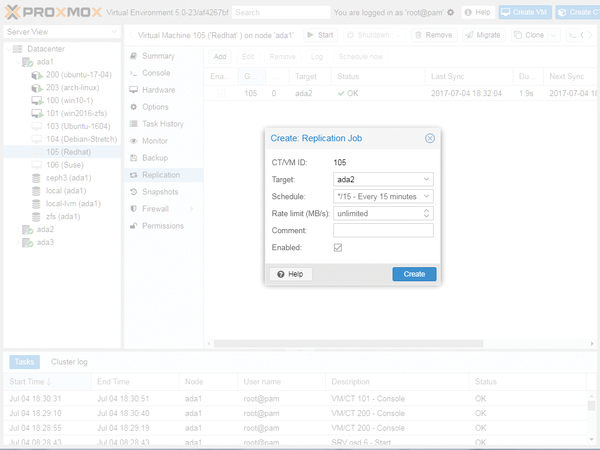
    Figure 5: Proxmox 5.0 also includes a new replication stack based on ZFS but that only works asynchronously.
    REF: http://www.admin-magazine.com/Archive/2017/42/Proxmox-virtualization-manager

    2017年10月29日 星期日

    Proxmox VE 5.1 with Ceph Luminous

    Proxmox VE 5.1
    • based on the latest Debian 9.2a 
    • modern Linux Kernel 4.13 with ZFS 0.7.2
    • Ceph v12.2 Luminous
    • BlueStore storage backend as default
    • ZFS: resumable “zfs send/receive” and hardware accelerated check 
    • many notable changes on the GUI

    REF: http://www.proxmox.com

    2017年9月18日 星期一

    Proxmox VE 5.1: new Ceph, Kernel, ZFS, LXC 2.1

    The upcoming Proxmox VE 5.1 will get production ready Ceph Luminous LTS, a new 4.13 Linux Kernel, latest ZFS and LXC 2.1. Our beta repositories already contain quite stable Ceph 12.2.x packages and the GUI integration includes a new cool features, e.g. creating Ceph storages for VMs and Containers with just one click on the "Create Ceph Pool" wizard. (This will also copy all needed authentication keys.)

    REF: https://forum.proxmox.com/threads/planning-proxmox-ve-5-1-ceph-luminous-kernel-4-13-latest-zfs-lxc-2-1.36943/

    2017年8月13日 星期日

    Unprivileged container mapping

    REF: https://pve.proxmox.com/wiki/Unprivileged_LXC_containers

    Let's see an example, we want to make uid 1005 accessible in an unprivileged container.
    First, we have to change the container UID mapping in the file /etc/pve/lxc/1234.conf:
    # uid map: from uid 0 map 1005 uids (in the ct) to the range starting 100000 (on the host), so 0..1004 (ct) → 100000..101004 (host)
    lxc.id_map = u 0 100000 1005
    lxc.id_map = g 0 100000 1005
    # we map 1 uid starting from uid 1005 onto 1005, so 1005 → 1005
    lxc.id_map = u 1005 1005 1
    lxc.id_map = g 1005 1005 1
    # we map the rest of 65535 from 1006 upto 101006, so 1006..65535 → 101006..165535
    lxc.id_map = u 1006 101006 64530
    lxc.id_map = g 1006 101006 64530
    
    Then we have to allow lxc to actually do the mapping on the host. Since lxc creates the CT using root, we have to allow root to use these uids in the container.
    First the file /etc/subuid (we allow 1 piece of uid starting from 1005):
    root:1005:1
    
    then /etc/subgid:
    root:1005:1
    

    You can start or restart the container here, it should start and see /shared mapped from the host directory /mnt/bindmounts/shared, all uids will be mapped to 65534:65534 except 1005, which would be seen (and written) as 1005:1005.

    2017年8月7日 星期一

    Linux Container Security

    LXC containers can be of two kinds:
    • Privileged containers
    • Unprivileged containers
    The former can be thought as old-style containers, they're not safe at all and should only be used
    in environments where unprivileged containers aren't available and where you would trust
    your container's user with root access to the host.
    The latter has been introduced back in LXC 1.0 (February 2014) and requires a reasonably recent
    kernel (3.13 or higher). The upside being that we do consider those containers to be root-safe and so,
    as long as you keep on top of kernel security issues, those containers are safe.
    As privileged containers are considered unsafe, we typically will not consider new container escape
    exploits to be security issues worthy of a CVE and quick fix. We will however try to mitigate those
    issues so that accidental damage to the host is prevented.
    REF: https://linuxcontainers.org/lxc/security/

    2017年8月5日 星期六

    Proxmox: limiting I/O

    • Disk IO limits are fully implemented with KVM - you can even configure them on the GUI ('Disk throttle' buttom).
    • For lxc: lsblk to get device:

    └─sda3 8:3 0 3.7T 0 part
    ├─pve-root 251:0 0 10G 0 lvm /
    ├─pve-swap 251:1 0 2G 0 lvm [SWAP]
    ├─pve-data_tmeta 251:2 0 116M 0 lvm
    │ └─pve-data-tpool 251:4 0 3.6T 0 lvm
    │ ├─pve-data 251:5 0 3.6T 0 lvm
    │ ├─pve-dir 251:6 0 50G 0 lvm
    │ ├─pve-vm--60200--disk--1 251:7 0 600G 0 lvm

    then
    limit read to 10KB/s for container 60200
    echo "251:7 10000" > /sys/fs/cgroup/blkio/lxc/60200/blkio.throttle.read_bps_device

    for iops use blkio.throttle.read_iops_device

    REF: https://forum.proxmox.com/threads/i-o-disk-limit.28591/